
For most U.S. users, Marketplaceapp is the strongest single-platform choice for garage-sale-style local commerce. It combines map-based discovery, in-app checkout with QR and cashless payments, and verified seller ratings with payment protection — all in one place, without juggling multiple apps.
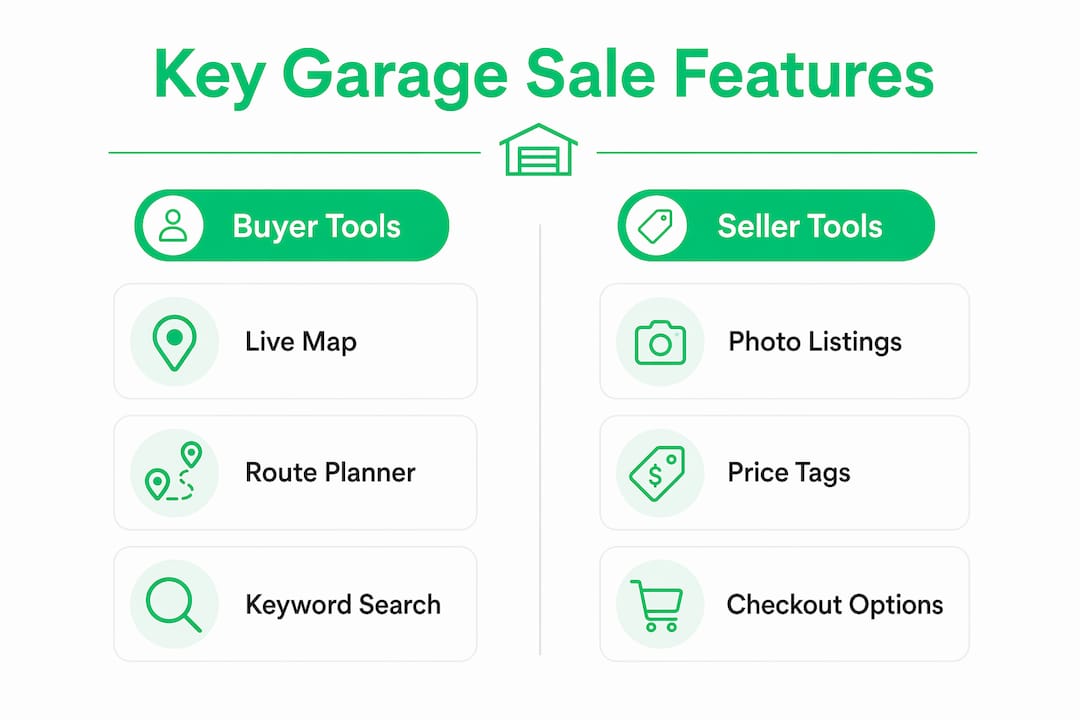
- Map-based discovery + route planning: Browse nearby sales on a live map, filter by category or distance, and plan your stops in sequence.
- In-app listing and checkout: Create a listing in minutes, generate QR-coded price stickers, and accept cashless payments through a PCI DSS-compliant processor.
- Verified seller ratings and payment protection: Buyer and seller profiles carry reviews, and in-app dispute tools back every transaction.
Pro Tip: Set up QR checkout before your sale opens. Sellers who pair clear item photos with scannable price codes move buyers through checkout faster and see fewer "I'll think about it" walkways.
Table of Contents
- What features should you look for in a garage sale app?
- How do you host a garage sale from listing to checkout?
- How do buyers find and plan garage sale routes with apps?
- What should you know about safety, payments, and fees?
- Legal considerations when using garage sale apps
- Key Takeaways
- Why the "best app" question misses the real problem
- Marketplaceapp is built for exactly this kind of local sale
- Useful sources and further reading
What features should you look for in a garage sale app?
The right app saves you time on both sides of the table. Here is what actually matters, ranked by impact.
Must-have features:
- Live map and location search: Buyers need to spot sales within a set radius; sellers need their listing to appear on that map the moment it goes live.
- Route optimizer: Smart route planning solves the classic buyer frustration of driving in circles or arriving after a sale wraps up.
- Listing tools: Multiple photos, category tags, scheduled start/end times, and the ability to mask your exact address until the sale opens.
- In-app chat: Direct messaging between buyer and seller cuts no-shows and lets buyers ask about specific items before driving over.
- Checkout and register: Built-in checkout features — quick price buttons, QR-scanned stickers, or a full cart — are faster and more accurate than manual cash counting.
- Multi-seller support: If neighbors or family members are splitting a sale, per-seller item tagging and automatic earnings splits prevent end-of-day arguments.
- Seller ratings and reviews: Verified profiles and public ratings reduce fraud and encourage repeat buyers.
- Privacy controls: Address masking until a preset time reduces no-shows and protects your home address from early-bird crowds.
- Dispute resolution: In-app tools to flag a problem transaction matter more than most sellers expect — until they need one.
Nice-to-have features:
- Promoted or boosted listings for peak weekend visibility
- Push notifications to alert nearby buyers when your sale goes live
- Offline mode for areas with spotty cell coverage
| Feature category | What a strong app delivers |
|---|---|
| Discovery | Live map, radius filter, category and keyword search |
| Checkout | QR stickers, cashless payments, cart mode |
| Seller management | Multi-seller splits, real-time totals, sales export |
| Promotion | Free listing + optional paid boost or featured placement |
| Safety | Address masking, verified profiles, in-app dispute tools |
Most apps offer free basic listings and charge for boosts or featured placement during peak weekend hours. Weigh that cost against how much extra traffic a boost actually drives in your ZIP code before paying.

How do you host a garage sale from listing to checkout?
A well-run sale follows a predictable six-step workflow. Nail each step and the day itself runs on autopilot.
- Create your listing. Add at least three photos per item, assign category tags (electronics, furniture, clothing, etc.), and write a short description with condition notes. A well-photographed electronics listing converts browsers into buyers faster than any price discount.
- Schedule and mask your address. Set your start time and enable address masking so only a general area shows until 30–60 minutes before the sale opens. This keeps early-bird crowds off your lawn the night before.
- Price items and build bundle deals. Price individually, then create bundle discounts (e.g., "any 3 clothing items for $5") to move volume. Check comparable listings on Marketplaceapp to anchor your prices to what buyers in your area are actually paying.
- Generate QR price stickers. Print a sheet of QR-coded stickers and attach one to each item. QR codes tied to items let buyers scan and pay instantly, cutting per-item checkout time dramatically on busy Saturday mornings.
- Promote before the sale. Use push notifications to alert nearby buyers, share a QR-coded sign on social media, and consider a paid boost if your listing is in a competitive area.
- Run checkout and reconcile. Accept cash and cashless payments side by side. For multi-family sales, multi-seller tracking assigns each item to its seller and calculates splits automatically — no spreadsheet required at the end of the day.
Pre-sale checklist:
- Listings live with photos and prices
- Address masking enabled, reveal time set
- QR sticker sheet printed and attached to items
- Cashbox stocked with small bills for cash buyers
- Signage posted with your sale's QR code
Pro Tip: For multi-family sales, assign a unique color tag or seller code to each person's items before printing QR stickers. The app reconciles earnings by seller in real time, so nobody has to trust a handwritten tally at the end.
How do buyers find and plan garage sale routes with apps?
The fastest way to hit the best sales is to combine map search, keyword alerts, and a route optimizer — then use in-app chat to confirm a sale is still running before you leave the house.
Buyer tactics that actually save time:
- Set a radius and date filter first, then narrow by category (vintage, tools, baby gear).
- Save searches and enable keyword alerts — "vintage records" or "mid-century furniture" — so the app notifies you when a matching listing appears nearby.
- Use the route optimizer to sequence your stops by distance. Real-time sale-day information and optimized directions address the most common buyer frustration: arriving at a sale that ended an hour ago.
- Message the seller through in-app chat before you drive over. Ask whether a specific item is still available and confirm hours.
- Mark "On my way" or "Arrived" in the app if the feature is available — sellers appreciate the heads-up and are less likely to pack up early.
Pro Tip: Block two hours on a Saturday morning and use the route optimizer to plan five stops in sequence. You will cover more ground and spend less on gas than driving to each sale individually as you spot them.
What should you know about safety, payments, and fees?
Expect a mix of cash and cashless sales at any garage sale. Platform fees and optional boosts affect your net, so know the cost structure before you list.
Payment and security basics:
- Accept cash, Venmo, Cash App, and in-app card processing where available. Offering multiple options removes friction for buyers who don't carry cash.
- Look for PCI-compliant payment processing. Seller ratings and in-app dispute tools are the other key trust layer — they reduce fraud and give both parties a path to resolution without going off-platform.
- Common fee models: a flat per-transaction fee, a percentage of each sale, or paid listing boosts. Read the fee schedule before your first sale.
Scam red flags to watch:
- Overpayment requests ("I'll send you $200 for a $50 item — keep the change")
- Requests to move payment off-platform to wire transfer or gift cards
- Buyers asking you to ship expensive items to an out-of-state address
Timeline expectations: A well-photographed listing with accurate pricing typically attracts buyers within the first weekend. Ongoing listings for higher-value items (furniture, electronics) can generate inquiries for weeks. For disputes, use the platform's in-app resolution tools first; in-person disputes over small-dollar items are usually faster to resolve on the spot.
Legal considerations when using garage sale apps
Hosting a garage sale in the U.S. is generally legal for occasional sellers, but a few rules apply depending on your state and city.
Some municipalities require a permit for garage sales, particularly if you host more than two or three per year. Check your local city or county ordinances before listing. Selling certain regulated items — firearms, food, prescription items, or recalled products — carries specific legal restrictions regardless of the platform you use.
For tax purposes, the IRS generally treats occasional garage sale proceeds as non-taxable when items sell for less than their original purchase price. If you sell frequently or at a profit, that income may be reportable. Consult a tax professional for your specific situation.
Platform terms of service also create legal obligations. Read the user agreement before listing, particularly clauses covering prohibited items, dispute resolution procedures, and liability limits. This article is general information, not legal or tax advice — confirm current rules with a qualified professional or your local government for your own situation.
Key Takeaways
Marketplaceapp is the strongest single-platform choice for U.S. garage-sale-style local selling because it combines map discovery, QR checkout, verified ratings, and in-app dispute tools in one place.
| Point | Details |
|---|---|
| Top app for most U.S. users | Marketplaceapp offers map search, cashless checkout, verified ratings, and dispute tools together. |
| Must-have features | Prioritize live map, route optimizer, in-app checkout, address masking, and seller ratings. |
| Seller workflow | Create listings with photos, mask your address, print QR stickers, and enable multi-seller splits before sale day. |
| Buyer strategy | Use keyword alerts and the route optimizer to plan stops in sequence and confirm availability via in-app chat. |
| Marketplaceapp next step | Create a free listing on Marketplaceapp to test the platform before your next sale weekend. |
Why the "best app" question misses the real problem
Most people searching for the best apps for yard sales are actually asking a different question: "How do I stop losing money and time at garage sales?" The app is just the lever.
The sellers who do best aren't the ones with the fanciest platform. They're the ones who show up with clear photos, honest prices, and a checkout setup that doesn't make buyers wait three minutes while someone counts change. The buyers who score the best deals aren't the ones who downloaded the most apps — they're the ones who set a keyword alert on Tuesday and show up first on Saturday.
What Marketplaceapp gets right is that it removes the friction on both sides without requiring a steep learning curve. Verified ratings mean buyers trust the seller before they arrive. In-app chat means sellers know who's coming. QR checkout means nobody's fumbling for exact change at 8 AM. That combination — trust, communication, fast payment — is what turns a chaotic garage sale into a transaction both sides want to repeat. The app category matters less than whether those three things are present.
Marketplaceapp is built for exactly this kind of local sale
If you want a platform where listing takes minutes and buyers in your area can find you the same day, Marketplaceapp is the place to start. It handles the full workflow: categorized listings with photos, location-based search, in-app chat, secure cashless checkout, and verified seller ratings — without requiring buyers or sellers to use a separate payment app.
For sellers preparing items to list, resellready.com offers practical guidance on pricing and presentation that pairs well with any marketplace listing. Whether you're clearing out a garage or hunting for deals every weekend, Marketplaceapp gives you the tools to do it faster and with less risk. Create your first listing today and see how many local buyers are already searching in your area.
Useful sources and further reading
- Marketplaceapp — local buying and selling platform (platform documentation — features, listings, payments)
- Yard Sale Treasure Map — App Store (independent app — route planning and map-finder features)
- YardSaler — App Store (independent app — address masking, checkout, and listing tools)
- Garage Sale Manager / POS (independent background reading — multi-seller POS, QR stickers, and split earnings)
- PCI Security Standards Council (primary source — payment security standards for in-app card processing)
- Yardly — Find Garage Sales App Store (independent app — map-based sale discovery and filters)
- eBay alternatives and peer-to-peer trust signals (independent background reading — buyer protections in peer-to-peer platforms)