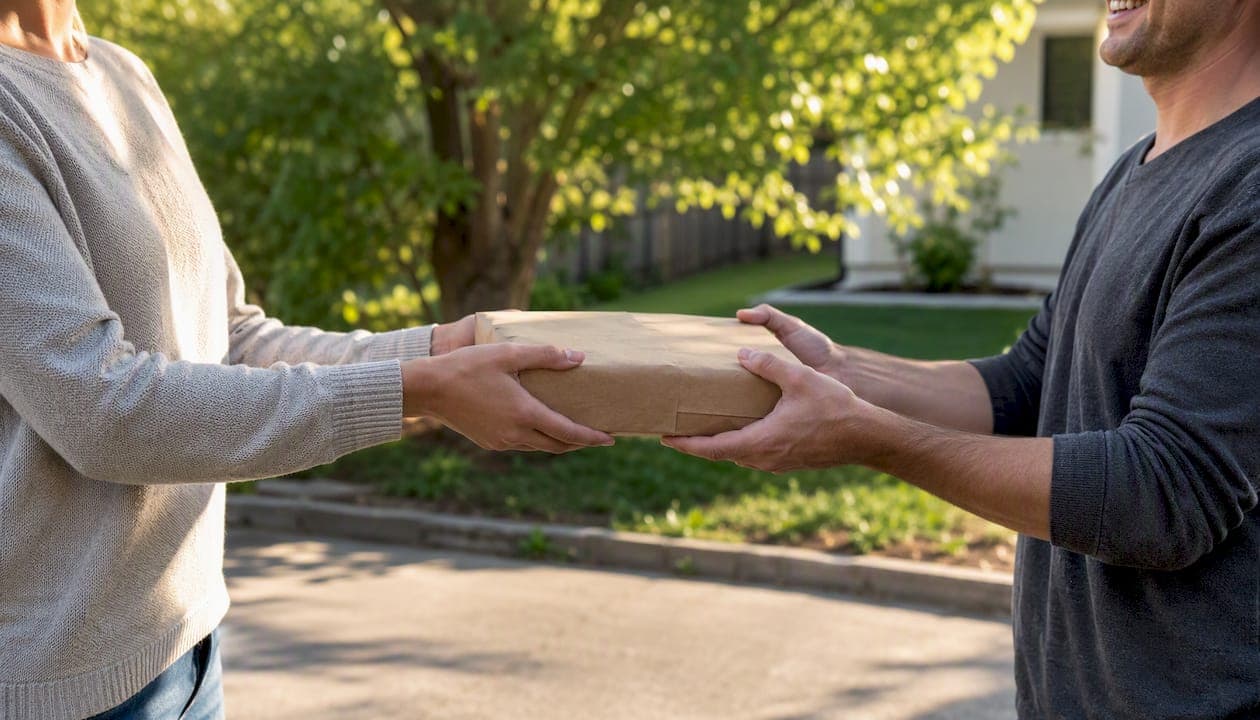
For fast, secure local transactions, MarketplaceAnywhere is the recommended starting point: list an item in minutes, accept a verified payment, and arrange a safe local pickup without juggling multiple apps. If you want to cast a wider net, three channels worth adding immediately are:
- Neighborhood buy/sell groups on Facebook (search "Buy & Sell" plus your city name)
- Niche category groups matched to your item type (electronics, furniture, clothing)
- Craigslist local sections, still one of the most active city-organized classifieds platforms in the U.S.
Each channel has its own quirks, and the sections below walk through exactly how to use them.
Key Takeaways
The fastest, safest path to a completed local sale combines a strong listing, the right group type, and a verified payment method before you hand anything over.
| Point | Details |
|---|---|
| Start with the right channel | Use MarketplaceAnywhere for a streamlined workflow, then add one niche group and one neighborhood group. |
| Write a specific listing | Include brand, model, condition, price, and a one-line pickup policy to filter serious buyers. |
| Price from sold listings | Check what buyers actually paid, not asking prices, and build in a 10–20% negotiation buffer. |
| Verify payment before handoff | Confirm funds in your own app; never accept overpayment checks or release an item on a screenshot. |
| Match item type to group type | Niche groups move electronics and collectibles faster; neighborhood groups work best for furniture and bulky items. |
Table of Contents
- What are local buy sell groups and how do they work?
- Where can you find active local buy sell groups?
- How do you pick the right groups and join them safely?
- How do you create a listing that actually sells?
- How should you price for speed vs. top dollar?
- What are the safest payment and pickup options?
- How do you spot scams and stay safe in local deals?
- How and when should you cross-post for maximum visibility?
- Which group types work best for which items?
- What does it cost and how long does it take to sell locally?
- What Marketplace has learned from local selling
- MarketplaceAnywhere puts the whole process in one place
- Sources
What are local buy sell groups and how do they work?
Local buy sell groups are member-run communities where people post items for sale, respond to offers, and arrange pickup or delivery with nearby buyers. They differ from a centralized marketplace app in one key way: a group is moderated by admins who set the rules, approve members, and can remove bad actors. A marketplace app, by contrast, handles listing infrastructure, payments, and dispute resolution at the platform level.
Buy-and-sell groups let members post items, require membership in many cases, can be niche or neighborhood-specific, and you can cross-post listings to Marketplace. That cross-posting ability is what makes groups and marketplace apps complementary rather than competing.
Three group types show up most often:
Neighborhood groups cover a specific town, zip code, or district. Best for bulky items (furniture, appliances, yard equipment) where local pickup is the only practical option.
Niche category groups focus on a single product type: vintage cameras, baby gear, power tools. Buyers here are higher-intent because they joined specifically for that category.
Institutional groups are tied to a school, church, university, or employer. Membership is built-in trust. Great for mid-range items when you want a vetted audience without much marketing effort.
The basic mechanic across all three: post a photo and description, field messages, agree on a price, then arrange pickup or shipping. Many sellers also cross-post to broader marketplace channels to extend reach.
Where can you find active local buy sell groups?
The fastest way to surface active groups is to search multiple channels at once rather than relying on a single platform's discovery tool.
- Facebook Groups — use the Groups search tab, type "Buy & Sell" plus your city or zip code, and filter by distance. Facebook buy-and-sell groups let members post items for sale, mark products as sold, and admins can enable a buy-and-sell feature.
- BuySellNearMe — an aggregator that surfaces local buy/sell postings from neighborhood and city-specific groups, useful for finding smaller communities that don't rank well in native app search.
- Local subreddits — search Reddit for your city name; many have active buy/sell threads or dedicated r/[CityName]forsale communities.
- Craigslist local sections — organized by city and category, still heavily trafficked for furniture, vehicles, and electronics.
- Community boards — Nextdoor, local Facebook community pages, and physical bulletin boards at libraries or coffee shops for hyper-local reach.
Search tips that actually work: Try "Buy & Sell [your city]," "[item type] [zip code]," or "[neighborhood name] swap." Most group discovery tools let you filter by distance; set it to a moderate local distance to start, then tighten it if you want pickup-only leads. Public groups are easier to join but attract more spam. Private groups with an approval step tend to have more serious buyers.
Pro Tip: Check a group's most recent post date before requesting to join. A group with no posts in the past two weeks is effectively dormant, regardless of its member count.
How do you pick the right groups and join them safely?
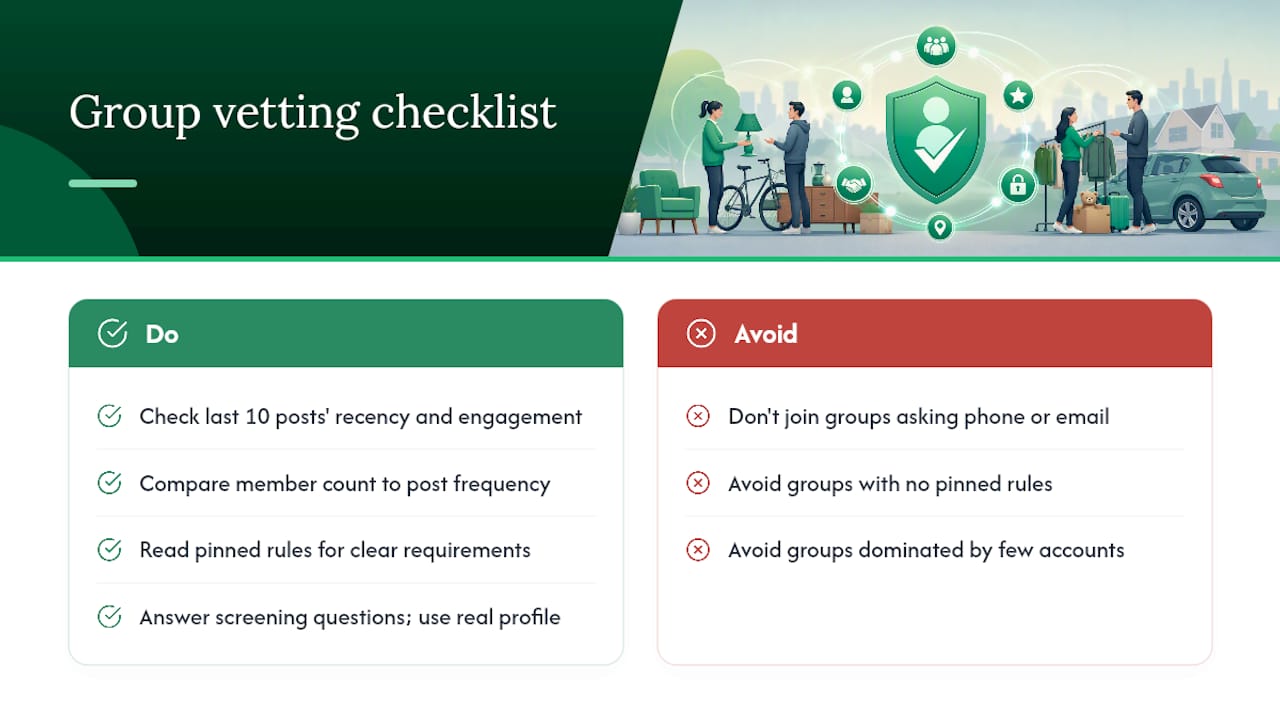
Joining the wrong group wastes time. Before you request membership, spend two minutes vetting the group against these criteria:
Activity level — scroll the last 10 posts. Are they from the past week? Do they get comments and "sold" marks? Low engagement means low buyer pool.
Membership count vs. post frequency — a group with 50,000 members but three posts per week is less useful than one with 5,000 members posting 30 times daily.
Pinned rules — active, well-run groups post clear rules: no spam, price required in listing, no shipping scams. Missing rules often mean missing moderation.
Admin responsiveness — some groups list admin names. Search their profile briefly. An active admin who responds to reports keeps the group cleaner.
When you request to join a private group, many ask a few screening questions. Answer them honestly and briefly: your general location, what you plan to buy or sell, and that you've read the rules. A complete profile photo and a few public posts on your account help too. Admins approve members faster when the account looks real.
Red flags worth walking away from: groups that ask for your phone number or email address as a join requirement, groups with no pinned rules, and groups where every post is from the same two or three accounts (a sign of low organic activity or even a spam ring).
How do you create a listing that actually sells?
The listing is where most sellers lose the sale before it starts. A weak title, a blurry photo, or a missing price sends buyers straight past your post.
Step-by-step listing checklist
- Write a specific title — include the brand, model, and condition. "Sony WH-1000XM4 Headphones, Excellent Condition" beats "Headphones for sale."
- State condition in one sentence — "Used twice, no scratches, original box included."
- List key specs — dimensions, model number, color, compatibility notes, anything a buyer would Google before purchasing.
- Set the price — include whether it's firm or negotiable (more on that below).
- Add a pickup or shipping note — "Local pickup only, [City Name]" or "Will ship buyer pays."
- State your preferred contact method and response window — "Message here, I respond within a few hours."
Photo checklist
- Main shot: item centered, plain background, natural light
- Detail shots: ports, labels, serial number area, any wear
- Measurement shot: tape measure visible next to the item
- Condition closeups: any scratches, stains, or repairs shown clearly
Hiding a flaw in photos doesn't protect you. It generates returns, disputes, and negative ratings.
Example listing template
Sony WH-1000XM4 Wireless Headphones Used twice, no scratches or damage, original box and cables included. Model: WH-1000XM4, Black. Battery life still full per app. $180 firm. Local pickup in Austin, TX. Message here — I reply same day.
Pricing language matters. "Firm" signals you've priced it fairly and won't negotiate. "OBO" (or best offer) invites lowball offers but moves items faster.
Buy and Sell Facebook Groups function as community marketplaces where local connections make face-to-face transactions easier. Selecting the right Facebook group type improves the chance of a successful, quick sale. Tailoring your listing title to the group's focus (a camera group wants the model number up front; a neighborhood group wants the city and price) makes a real difference in response rate.
Pro Tip: Include a one-line pickup policy directly in the listing: "Public meetup only, [location name]." It filters out buyers who won't agree to safe meetup terms before you've invested any time.
How should you price for speed vs. top dollar?
If you can wait a week or two, price at market and hold.
A few pricing habits that consistently help:
- Check sold listings first — search the item on any marketplace and filter for "sold." Asking price is irrelevant; what buyers actually paid is the number that matters.
- Round psychologically — $45 moves faster than $50; $95 moves faster than $100. The difference is small but real.
- Build in a negotiation buffer — price $10–20 above your floor on items under $100, more on higher-value items.
- Factor in category demand — small electronics (cables, chargers, gaming accessories) sell in hours when priced right. Furniture can take days to weeks depending on size and season. Clothing moves fastest in niche groups or when bundled.
Timing matters too. Spring and fall tend to be peak seasons for local selling, partly because people are decluttering and partly because weather makes meetups easier. For a deeper look at when to list for fastest results, the best time to sell locally guide breaks down timing by category and season.
What are the safest payment and pickup options?
Safest practical approach: cash in person for low-value items; platform-handled digital payment (where the platform holds funds until pickup is confirmed) for anything over $50. Avoid peer-to-peer payment apps for transactions with strangers unless you can verify the buyer's identity.
Payment options compared
- Cash — no fees, no chargebacks, immediate. Risk: carrying large amounts; counterfeit bills on high-value sales.
- Peer-to-peer apps (Venmo, Zelle, Cash App) — fast and convenient, but most offer no buyer or seller protection for goods transactions. A buyer can claim non-receipt and you have limited recourse.
- Platform escrow — the safest option when available. Funds are held until the transaction is confirmed complete.
- In-person card readers — useful for sellers who do volume. Adds a small processing fee but gives buyers confidence.
Pickup safety checklist
- Meet in a public place: a police station parking lot, a busy coffee shop, or a well-lit retail parking lot
- Daytime meetups only when possible
- Bring a friend or tell someone your location and expected return time
- Verify payment is cleared before handing over the item
- For high-value items, bring a simple written receipt (item description, price, date, both names)
- Never agree to porch drops or unattended pickups
For vehicle sales or other high-value transactions, the local car selling guide covers additional payment and safety steps specific to big-ticket items.
How do you spot scams and stay safe in local deals?
The three most common local selling scams are overpayment checks, fake payment confirmations, and phishing links sent through group messages.
Overpayment scam: A buyer sends a check for more than the asking price and asks you to wire back the difference. The check bounces days later. Rule: never accept a check for more than the agreed amount, and never wire money to a buyer.
Fake payment confirmation: A buyer sends a screenshot claiming they've paid via Venmo or Zelle. Always verify in your own app before handing over anything.
Phishing links: Messages like "Check out this buyer protection service" with a link. Don't click. Legitimate platforms don't require you to visit third-party sites to complete a sale.
Safety checklist: before, during, and after
Before the meetup:
- Check the buyer's profile: join date, post history, any reviews or ratings
- Confirm the meetup location in writing via the platform's chat
- Share your location with a trusted contact
During the meetup:
- Meet in public, daylight preferred
- Verify payment in your own app before releasing the item
- Don't bring more cash than necessary
After the sale:
- Mark the item as sold immediately
- Save the chat log for 30 days in case of a dispute
- Leave an honest rating if the platform supports it
If a message feels off — pressure to move fast, unusual payment requests, offers well above asking price — stop communicating and report the account. One sentence covers it: when something feels wrong, it usually is; block and report before you lose anything.
For broader guidance on Nextdoor alternatives and neighborhood safety, that resource covers additional community-specific safety considerations.
How and when should you cross-post for maximum visibility?
Cross-posting broadens reach significantly, but the quality of that reach depends on where you post. A niche group that matches your item type will almost always generate higher-intent leads than a generic community board with ten times the members.
Cross-posting do's and don'ts
Do:
- Post to one niche group and one neighborhood group simultaneously
- Adjust the title slightly per group (lead with model number in niche groups, lead with price and location in neighborhood groups)
- Update all posts immediately when the item sells
Don't:
- Spam identical posts across 15 groups at once — admins flag and remove these
- Post to groups outside your realistic delivery or pickup range
- Ignore group-specific rules about reposting frequency
Timing recommendations: Thursday evening through Sunday afternoon tends to generate the most buyer activity for local sales. Morning posts (before 9 AM) and evening posts (7–9 PM) get more eyeballs than midday. If a listing goes quiet after 48 hours, bump it by editing the description slightly or adding a new photo — most platforms treat an edit as fresh activity.
Shopify and Dummies both note that mobile posting makes listing faster and that you can post listings to multiple groups or Marketplace from the same publisher tool. Using a mobile app to manage cross-posts keeps everything in one place and cuts the time spent copying and pasting between platforms.
For a broader look at local selling apps that support cross-posting, that guide covers the top options by category.
Which group types work best for which items?
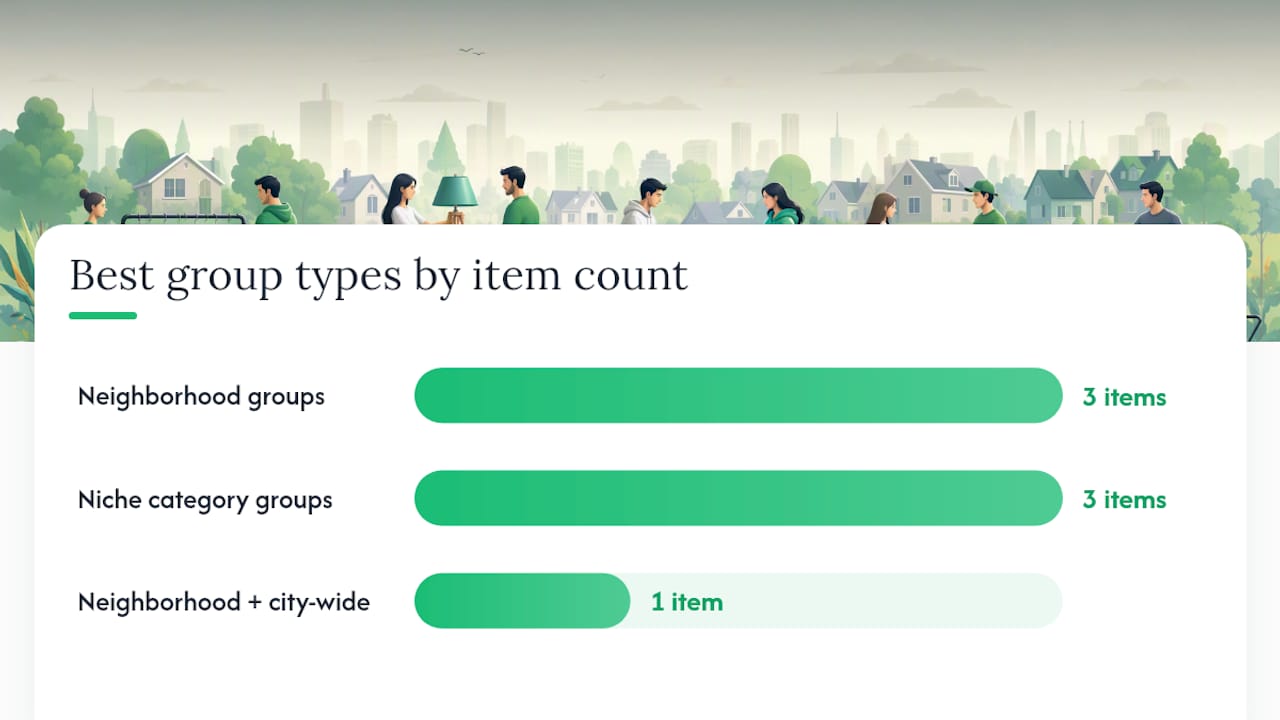
Niche-specific groups and neighborhood groups each outperform broad community boards, but for different item classes. Niche groups attract buyers who already know what they want and are ready to pay; neighborhood groups move bulky items that nobody wants to ship.
| Item Type | Best Group Type | Runner-Up |
|---|---|---|
| Furniture / large appliances | Neighborhood groups | Local community boards |
| Electronics / tech gear | Niche category groups | Neighborhood groups |
| Clothing / shoes | Niche category groups | Neighborhood groups |
| Vehicles | Neighborhood + city-wide groups | Classified ad platforms |
| Baby / kids gear | Neighborhood groups | Institutional (school/church) groups |
| Collectibles / hobby items | Niche category groups | City-wide buy/sell groups |
| Tools / yard equipment | Neighborhood groups | Niche trade groups |
The practical test: post the same item once to a niche group and once to a neighborhood group, then compare the quality of inbound messages within 48–72 hours. Serious questions about specs and condition signal a higher-intent buyer. "Is this still available?" with no follow-up usually isn't.
Buy-and-sell Facebook groups act as community marketplaces. Local groups enable face-to-face transactions, and niche groups often yield faster, more reliable sales for category-specific items. That pattern holds across platforms, not just Facebook.
What does it cost and how long does it take to sell locally?
Most local sales through buy/sell groups cost nothing besides your time. You post for free, negotiate directly, and collect cash or a peer-to-peer payment with no platform cut. That changes when you use paid features.
Potential costs to expect:
- Promoted or boosted listings — some platforms charge a flat fee or a percentage to push your listing higher in search results
- Transaction fees — platform-handled payments typically carry a processing fee (commonly 2–5% depending on the platform)
- Shipping costs — if you offer shipping, factor carrier rates into your price or charge separately
Baseline time-to-sell estimates:
- Small electronics, accessories: hours to 2 days when priced right
- Clothing, shoes: 1–5 days in a niche group; longer in a general neighborhood group
- Furniture, appliances: 3–10 days, heavily influenced by season and item size
- Vehicles: 1–4 weeks depending on price, condition, and local demand
What shortens the timeline: competitive pricing, strong photos, posting in the right group type, and listing on a Thursday or Friday. What lengthens it: overpricing, poor photos, posting in a low-activity group, or listing a seasonal item off-season.
What Marketplace has learned from local selling
Local commerce works best when trust is built into the transaction from the start, not patched on afterward. The platforms and groups that generate the most successful local sales share three things: verified identities, transparent ratings, and a clear payment trail. When any of those three are missing, disputes and no-shows follow.
MarketplaceAnywhere was built around that observation. Location-based discovery means buyers are already nearby. Verified seller ratings give both sides a track record to check before agreeing to meet. Secure payment handling removes the "did it go through?" uncertainty that causes most last-minute cancellations. The step-by-step checklist in this guide maps directly to how the platform is designed: list accurately, price competitively, communicate clearly, and complete the transaction safely.
If you've been relying on a single neighborhood group and getting inconsistent results, the combination of a dedicated marketplace platform plus one or two well-chosen niche groups almost always outperforms either channel alone.
MarketplaceAnywhere puts the whole process in one place
Selling locally through scattered groups works, but it takes real coordination: different apps, different rules, different payment methods, and no unified way to track what's sold. MarketplaceAnywhere solves that by combining local listings, secure payments, and verified seller ratings into a single workflow.
The listing template from this guide works directly on the platform: add your photos, write a specific title, set your price, and your item is visible to nearby buyers immediately. Payment is handled through the platform so you're not chasing screenshots or hoping a Venmo transfer clears. Verified ratings on both sides mean you know who you're meeting before you agree to a time and place.
For sellers who want to move items fast without the friction of managing five different group chats, browse local listings or post your first item on MarketplaceAnywhere and see how quickly a well-priced, well-photographed listing attracts serious buyers.
Sources
These references back the practical guidance in this article and are worth bookmarking for your own research:
- How to Use Buy/Sell Groups on Facebook | dummies
- How To Sell on Facebook: A Beginner’s Guide for 2026 - Shopify
- Buy and Sell Facebook Groups | GroupBoss
- Buy Sell Near Me – See all the things that locals are buying and selling.
- Craigslist — Wikipedia