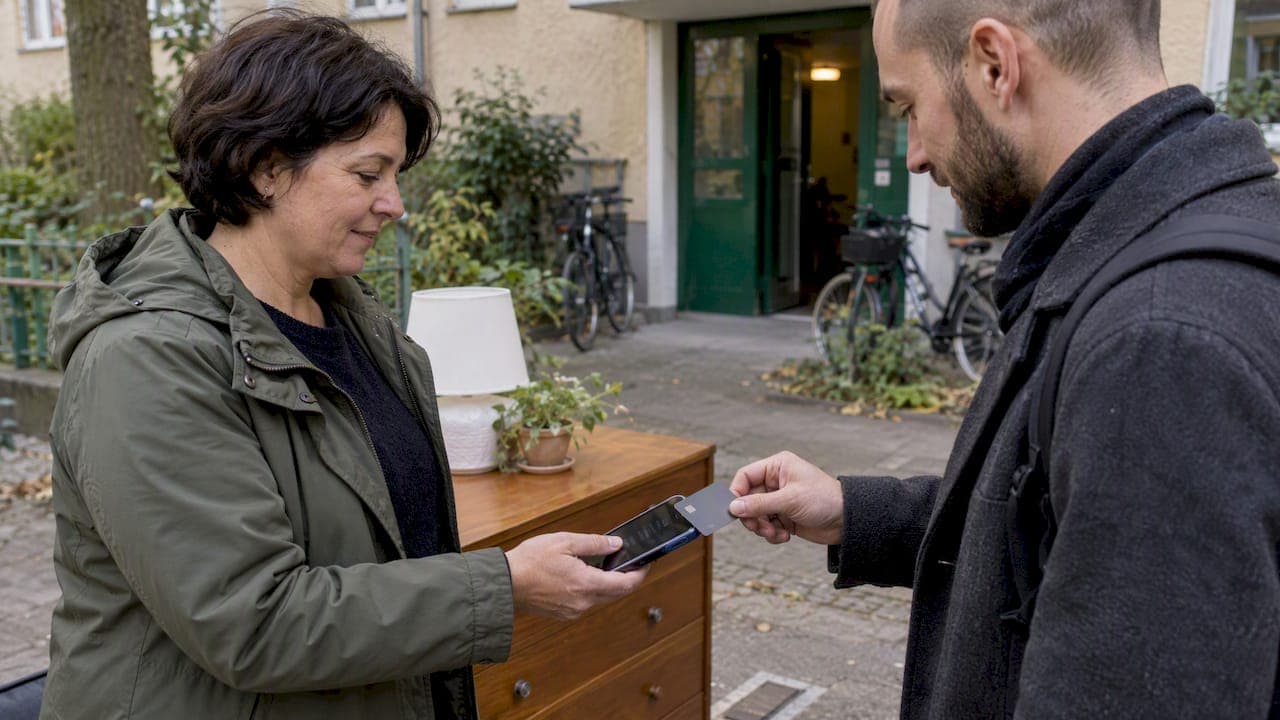
Cashless local payments let you buy or sell in person without handing over banknotes, using cards, mobile wallets, QR codes or instant bank transfers instead. The practical takeaway: no single method fits every situation, so you choose based on local infrastructure, transaction fees and who your customers are, while keeping a cash option available for people who rely on it.
TL;DR:
- Card processing fees commonly run 1.5% to 4%, so compare them with your average sale and margin before choosing a provider.
- Static QR codes require buyers to enter the amount, while dynamic codes include it and link each payment to a specific sale for cleaner records.
- Instant bank transfer rails can settle faster and often cost less than cards, but country specific availability rules out a universal setup.
- Check payout timing before signing up: some methods settle the same day, while others take one or two business days and can affect inventory purchases.
- Confirm payment in your account before handing over goods, and keep receipts or exchange photos; screenshots can be faked, and disputes allow little time.
Table of Contents
- What counts as a cashless local payment?
- Common methods merchants and customers use for local cashless payments
- How contactless, QR and fast rails actually work
- Benefits and trade-offs for customers and local merchants
- What merchants should consider before adopting cashless acceptance
- Step-by-step: start accepting cashless local payments today
- Steps and tips for resolving common payment disputes
- Regulatory and compliance considerations for local cashless payments
- Security best practices to avoid scams and unauthorized transactions
- Comparing popular local cashless payment platforms
- What customers need to know before paying cashless locally
- Balancing secure cashless options with inclusion and safety
- List and sell locally with secure payment support
- FAQ
- Sources
What counts as a cashless local payment?
"Cashless" simply means no physical currency changes hands. "Contactless" is narrower: it refers specifically to tap-to-pay technology using near-field communication (NFC), one method among several cashless options. A mobile wallet stores card or bank credentials on a phone or watch for tapping or scanning. QR codes let a buyer scan a code to pull up payment details instead of tapping a card. Fast rails are instant account-to-account transfer systems that move money directly between bank accounts in real time.
Some of these are universal, others are not. India's Unified Payments Interface, for example, is a country-specific instant-payment system built around local banking rails, not something available everywhere. A street vendor might rely on a static QR code, a café on a card terminal, a retail counter on Tap on Phone, and a peer-to-peer seller on a payment link sent through a messaging app.
Common methods merchants and customers use for local cashless payments
Most in-person cashless transactions fall into a handful of categories, each suited to different merchant sizes and customer habits.
- Card and contactless terminals, including Tap on Phone: a dedicated terminal or a smartphone running Tap on Phone software accepts tapped cards or devices with minimal hardware investment.
- Mobile and wearable wallets: credentials stored on a phone or watch are authorized through the device, often with biometric confirmation before the tap.
- QR codes, static or dynamic: a static code (printed once, reused indefinitely) suits a small stall, while a dynamic code generated per transaction suits businesses that need exact amounts tied to each sale.
- Payment links and P2P apps: a link sent through text or chat works well for local pickups, deliveries or deals arranged through a marketplace listing.
Fee sensitivity and sales volume usually decide the fit: a high-volume shop benefits from a terminal's speed, while an occasional seller may find a payment link or QR code simpler and cheaper to set up.
How contactless, QR and fast rails actually work
A contactless tap uses NFC to send an authorization request that includes a one-time cryptogram, a single-use code that protects the transaction from being copied or replayed, according to EMVCo's technical explanation. The device and terminal need to be close, roughly two inches apart, and whether a PIN is required depends on the issuer and the country's own rules, so tap limits vary by market.
QR payments work differently depending on the code type. A static QR code sends payment to a fixed account and the customer types in the amount, while a dynamic QR code is generated for that specific sale and already carries the amount, which affects how cleanly the transaction reconciles in a merchant's books.
Fast rails skip cards entirely and move money directly between bank accounts. India's UPI is a country-specific example that supports 24/7 real-time transfers through a mobile number, UPI ID or QR code, with World Bank documentation describing how merchants accept payment through either static or dynamic codes. Settlement on these rails tends to be faster than card networks, which matters for refunds and day-to-day cash flow.
Benefits and trade-offs for customers and local merchants
Cashless acceptance brings real advantages: faster checkout, automatic transaction records, built-in fraud protections compared with carrying cash, and a path toward financial inclusion for people without easy access to a bank branch. It also comes with trade-offs worth weighing honestly. Fees cut into margins, phishing and account-takeover scams target digital payment users, settlement can lag by a day or two depending on the method, and some customers, particularly those without smartphones or bank accounts, risk being left out if cash disappears entirely.
Cashless payments kept growing through 2024, with advanced economies averaging 579 cashless payments per person compared with 242 in emerging and developing economies, and fast payments increasingly used for small everyday purchases. Cash, though, still holds a real role in both groups, which is why most practical setups plan for both.
What merchants should consider before adopting cashless acceptance
Choosing the right mix starts with the numbers, not the technology. A few checks before committing:
- Map out total fees, including per-transaction rates, monthly gateway charges and hardware costs, against your actual margin per sale.
- Confirm settlement timing: some methods pay out same-day, others take one or two business days, which affects how you manage inventory purchases.
- Pick hardware and software that match your volume: a dedicated terminal, Tap on Phone, a QR-only setup or a simple payment-link workflow all serve different scales.
- Check interoperability and reporting, along with how refunds, chargebacks and fraud disputes are actually handled by the provider.
- Plan for customers who cannot or will not go cashless, keeping a cash or alternative option visible.
Card fees commonly run in the 1.5% to 4% range depending on the processor and card type, a detail our analysis of cash versus cashless sales breaks down further for small retailers. Our guide to selling app fees also walks through how fees affect smaller sales specifically.
Pro Tip: Run the fee math on your average sale price before picking a provider. A flat monthly fee can cost more than a per-transaction rate if your sales volume is low.
Step-by-step: start accepting cashless local payments today
- Match methods to your customers and margins. If most buyers carry smartphones, a QR code or Tap on Phone setup likely beats a dedicated terminal in upfront cost.
- Select your acceptance method and confirm the fine print. Check the fee schedule and settlement timing before signing up with any provider.
- Set up receipts and basic fraud checks. Decide how you will confirm payment before handing over goods, especially for higher-value items.
- Test with low-value transactions first. Run a handful of small sales to confirm the process works and train anyone helping you sell.
- Monitor results for 30 to 90 days and adjust. Track which methods customers actually use and whether the fees match what you expected.
This sequence keeps risk low while you figure out what actually works for your specific customer base.
Steps and tips for resolving common payment disputes
Disputes usually start the same way: a buyer claims an item was never received, was misrepresented or that a payment was made in error. The first step is always documentation. Keep a timestamped record of the transaction, a description of the item condition and, where possible, a photo taken at the point of exchange.
When a disagreement comes up, address it directly and quickly. Most payment providers and card networks give a limited window, often measured in days, to file or respond to a dispute, so delay works against you. Our guide on winning refunds for local sales lays out a 48 to 72 hour window that tends to work well for resolving issues before they escalate into formal chargebacks.
If a buyer disputes a card or wallet charge after the fact, the relevant network's chargeback process takes over, and the merchant typically needs to show proof of delivery or service to contest it. For QR or payment-link transactions, resolution depends heavily on the platform used, so confirm the dispute policy of whatever app or service you are accepting payment through before you rely on it for higher-value sales.
Clear communication prevents most disputes before they start. State your return policy, confirm the exact item and price before payment, and get a visible confirmation (a receipt, text or app notification) that the transaction went through on both sides.
Regulatory and compliance considerations for local cashless payments
Local cashless payments touch two main regulatory areas: data protection and anti-money laundering rules. Payment data, including card numbers, wallet credentials and transaction history, falls under data protection laws that vary significantly by country and region, which govern how that information can be stored, shared or used.
Anti-money laundering rules generally apply more to payment processors and platforms than to individual sellers, but they shape what you will encounter as a user. Identity verification steps, transaction limits and reporting thresholds that providers enforce all trace back to these requirements. A sudden request for identity documents from a payment provider is usually a compliance step, not a red flag about your account.
The rules that actually apply to your transaction depend on your country and the payment method's home jurisdiction, so when a question of legality or compliance matters for a specific sale, check the provider's own terms or a relevant government resource rather than assuming one set of rules applies everywhere. The World Bank's work on digital financial inclusion notes that account ownership has expanded globally but does not by itself guarantee safe or compliant digital-payment use, which is part of why these frameworks exist in the first place.
Security best practices to avoid scams and unauthorized transactions
Most cashless payment fraud targets the moment of confirmation, not the technology itself. Before releasing an item or accepting payment, confirm the transaction actually cleared in your own app or account rather than trusting a screenshot or a claimed confirmation message. Screenshots are easy to fake.
Keep devices locked with biometric or PIN protection, since a lost or stolen phone with an unlocked wallet app is a direct path to unauthorized spending. Avoid clicking payment links sent through unsolicited messages, and type a known provider's web address directly rather than following a link, especially for anything claiming a refund is waiting.
For in-person local sales, meet in well-lit, public locations and confirm payment before handing over goods, particularly for higher-value electronics or vehicles. Our breakdown of common local selling scams covers specific patterns sellers run into, and our broader guide to secure payment methods walks through safer choices for both buyers and sellers. If you are specifically selling electronics locally, a checklist for avoiding scams on electronics sales covers verification steps worth running through before any handoff.

Comparing popular local cashless payment platforms
Card networks and terminal providers remain the default for established retail locations, offering broad acceptance but carrying per-transaction fees that eat into thin margins on small sales. Tap on Phone services turn an existing smartphone into a contactless terminal, which suits mobile vendors or pop-up sellers who do not want to buy dedicated hardware, and adoption of this approach has expanded to more than 115 markets according to Mastercard's reporting on tap-to-pay trends.
QR-based wallets work best where smartphone penetration is high and fees need to stay low, though acceptance depends heavily on which app the customer already has installed. Instant account-to-account rails, where available, tend to suit higher-value or recurring local transactions since settlement is faster and fees are often lower than card processing, though these systems are country-specific rather than globally available.

For peer-to-peer local sales arranged through a listing or classifieds platform, a payment link or an in-app payment flow often beats setting up merchant processing entirely, since the volume rarely justifies the overhead. Group or recurring local payments, like splitting costs for a shared activity, are increasingly handled through purpose-built apps that track who owes what, similar to how cashless payment tracking works for pickup sports organizers. The right platform depends less on brand and more on your transaction size, frequency and who you are transacting with.
What customers need to know before paying cashless locally
Before you tap, scan or transfer, confirm what a merchant actually accepts. A sign at the register or a quick question avoids an awkward moment at checkout, especially for cash-only stalls or smaller vendors who have not added card or QR acceptance yet.
Always get some form of receipt, whether a printed slip, an app notification or a text confirmation, since this is your main proof if a dispute comes up later. For higher-value local purchases, a receipt with a date, amount and description of the item protects both sides.
Authentication varies by method: a tapped card under a certain amount may not require a PIN, while a larger purchase typically does, and mobile wallet payments often require a fingerprint, face scan or device passcode before the transaction goes through. Confirm the payment actually processed, visible in your own banking or wallet app, before walking away with goods, since a merchant's handheld device showing "approved" is not always something you can independently verify in the moment. Our guide to online classifieds safety covers additional checks worth running for local, in-person deals.
Balancing secure cashless options with inclusion and safety
Secure payment acceptance only works when it is paired with real verification and clear communication, which is why we built verified seller ratings and secure payment handling directly into how listings get completed on MarketplaceAnywhere. A payment method is only as trustworthy as the person on the other end of the transaction, and ratings history gives buyers and sellers something concrete to check before they commit.
We also think transparency about accepted payment methods prevents most disputes before they start: stating upfront whether you take cash, a QR scan or an app-based transfer saves both sides a wasted trip. Receipts and clear communication matter more than which specific payment rail you choose.
— Marketplace
List and sell locally with secure payment support
Turning items you no longer need into cash works best when the payment side is handled, not guesswork you figure out mid-sale. We support secure payment handling, seller ratings and a listing flow for transactions across various categories including electronics, fashion, vehicles, pets, and home goods.
Create a listing or check how seller fees work at Marketplaceapp and get your next local sale moving.
FAQ
Are there countries that are considered cashless?
No country operates entirely without cash today, though some rely much more heavily on digital payments than others. Usage patterns vary widely by region, and BIS data shows cashless payments growing fastest in advanced economies while cash still plays a meaningful role even there.
What are LC and TT payment terms?
LC (Letter of Credit) and TT (Telegraphic Transfer) are trade-finance payment terms used mainly in international business transactions between companies, not in everyday local or in-person purchases. They involve a bank guaranteeing or wiring funds between parties, a different mechanism entirely from tapping a card or scanning a QR code at a local sale.
What are the top payment processors available?
The right processor depends on your country, transaction volume and whether you need a physical terminal, Tap on Phone or an online payment link, since availability and fees vary by region. Rather than naming a single best option, compare fee structures and settlement timing for the processors available in your specific market before committing.
What is meant by cashless payment?
A cashless payment is any transaction completed without physical currency, using a card, mobile wallet, QR code or direct bank transfer instead. It covers a range of methods, from tapping a phone at a register to scanning a code at a street stall, all of which move money electronically rather than in cash.
How do fees typically affect small local sales?
Card processing fees commonly fall in the 1.5% to 4% range, which can meaningfully cut into margin on lower-priced items, a dynamic our analysis of cash versus cashless sales covers in detail. Comparing fee structures against your typical sale price before choosing a method helps avoid an unpleasant surprise at settlement.
Sources
- BIS commentary — Tap a card, pay by phone, but cash still holds its own (Red Book summary)
- EMVCo — EMV contactless technology
- Mastercard — What you need to know about tap and go