
The safest default for any in-person trade is a police safe exchange zone or another camera-covered public spot, met during daylight. Confirm the exact meeting point and a tight arrival window inside MarketplaceAnywhere chat before you leave the house. Then verify payment in your own account, not a screenshot, before the item changes hands.
That's the whole formula. Everything else in this guide just fills in the details so you can run it on autopilot:
- Default to a police department safe exchange zone or busy, well-lit public location.
- Lock in a specific arrival window (10 minutes, not "sometime this afternoon") in the app chat.
- Confirm funds landed in your own account before handing over the item.
- Bring a friend when you can, especially for higher-value items.
Key Takeaways
A safe, low-friction meetup depends on picking a camera-covered public location, confirming exact time and payment details in-platform, and verifying funds before releasing any item.
| Point | Details |
|---|---|
| Pick the right location | Default to a police safe exchange zone or busy, well-lit public spot during daylight hours. |
| Confirm before you leave | Lock in price, location, arrival window, and payment method inside app chat ahead of time. |
| Verify funds directly | Check your own account balance for digital payments; never accept a screenshot as proof. |
| Bring backup when possible | A friend or trusted contact lowers risk, especially for higher-value trades. |
| Use MarketplaceAnywhere's tools | Verified ratings, location-based search, and in-app chat support every step of this checklist. |
Table of Contents
- Meetup Scheduling Tips That Actually Prevent No-Shows
- Which Meetup Locations Work Best for a Trade?
- How Do You Schedule and Confirm a Meetup Without the Back-and-Forth?
- What Payment Methods Are Safe for In-Person Trades?
- What Happens On-Site: Inspect, Test, Hand Off, Leave
- When Should You Walk Away From a Meetup?
- How MarketplaceAnywhere Supports This Workflow
- How to Handle Rescheduling or Cancellations Without the Drama
- How to Set Clear Expectations Before You Ever Meet
- Managing Multiple Meetups Without Losing Track
- Sources
Meetup Scheduling Tips That Actually Prevent No-Shows
Most no-shows aren't malicious. They happen because nobody nailed down a time, place, or price in writing, and one side quietly decides it's not worth the hassle. Building a repeatable pre-meetup routine kills that ambiguity before it starts.
Here's a checklist you can run through every single time, in under two minutes:
- Confirm the buyer or seller's profile and item details match the listing.
- Agree on the exact payment method and amount before either of you leaves home.
- Pick a default public meetup spot and set a 5 to 10 minute arrival window.
- Text a trusted contact your plan and set a rough check-in time.
Saving a confirmation template that spells out price, location, arrival window, and payment method ahead of time cuts down on the back-and-forth that leads to confusion, according to local pickup safety guidance. You write it once, then paste and tweak it for every deal.
Pro Tip: Save your go-to meetup message as a note on your phone. Something like "Meeting at [location] at [time], I'll be driving a [vehicle], payment is [method]" saves you from retyping the same details for the tenth trade this month.
Which Meetup Locations Work Best for a Trade?
Not every deal needs the same level of caution, but the location hierarchy stays consistent. Rank your options by camera coverage and foot traffic, not convenience.
- Gold standard: Police department safe exchange zones. They typically offer 24-hour video surveillance and sit close to law enforcement, though departments don't staff the actual transaction or guarantee anything goes smoothly.
- Solid backup: Bank lobbies, bank parking lots, or the customer service area of a busy retail store. Cameras and crowds do a lot of the safety work here.
- Workable in a pinch: Well-lit gas stations or a busy coffee shop parking lot, ideally still during daytime hours rather than after dark.
- Avoid entirely: Isolated parking lots, dim residential streets, or anywhere you'd hesitate to walk alone at night. For home pickups, keep it to the curb or a building lobby with clear boundaries on what parts of the home are off limits.
Programs built around designated exchange zones provide signage and surveillance, but explicitly do not send staff to witness the trade or vouch for either party. The cameras deter bad behavior; they don't referee the deal.
How Do You Schedule and Confirm a Meetup Without the Back-and-Forth?
Vague scheduling is where most friction creeps in. "Let's meet later today" invites confusion. A specific window closes the door on it.
- Set a narrow arrival window (say, 10 minutes) and ask for an "on my way" or "just arrived" message when the time comes.
- Confirm the vehicle description, which entrance you'll use, and a specific landmark, not just a store name.
- Keep every message inside MarketplaceAnywhere chat. It builds a record you can point to if something goes sideways.
- For high-demand items, consider a small deposit or a timed hold to discourage last-minute no-shows.
Fairfax County's police department advises meeting in public during daylight hours as one of the simplest ways to cut risk, and that guidance pairs naturally with a tight time window: less waiting around means less exposure. If you're weighing when in the week to even list an item, a timing guide can help you pick windows when buyers are actually free to meet.
Pro Tip: Treat the meetup like a short appointment, not a favor you're doing someone. A firm window signals you're organized, and organized sellers get fewer flaky buyers.
What Payment Methods Are Safe for In-Person Trades?
The right payment method depends almost entirely on dollar amount, not personal preference.
- Small trades: Cash, counted calmly and visibly, in a camera-covered location.
- Digital payments: Confirm the funds actually landed in your own app or account. A screenshot proves nothing, since screenshots of app transfers can be faked and shouldn't count as proof on their own.
- Larger transactions: Use escrow or a platform-protected payment option when it's available. Skip wire transfers and money orders entirely for a local trade.
- If someone suggests a payment method you've never heard of or didn't agree to, decline and stick to the plan you already confirmed.
Bringing a companion to the trade lowers your risk compared to going alone, and if you can't bring someone, at minimum share your location and plan with a trusted contact before you leave.
What Happens On-Site: Inspect, Test, Hand Off, Leave
The actual exchange should move fast once you're both there. Here's the sequence:
- Buyer inspects first. Visual check, then functional tests (plug it in, power it on), and photograph any serial numbers or existing damage.
- Seller preps ahead of time. Wipe personal data from devices, bring any accessories you promised, and confirm funds have arrived before handing anything over. For electronics specifically, factory-reset the device and remove your SIM before you even leave home, so the buyer can verify authenticity without touching your accounts.
- Handoff. Count cash in view of the cameras, or confirm the in-app payment receipt on your own screen. A quick photo of the item's condition at handoff protects both of you if a dispute comes up later.
- Exit. Know your route out before you arrive, and keep your phone charged. There's no reason to linger once the trade is done.
If you're selling something a buyer needs to test, like a bike or a laptop, mention that upfront in your confirmation message and pick a spot with an outlet or room to test ride. Our guide on verifying item authenticity walks through how to check serial numbers and spot counterfeits before you even leave the house.
Pro Tip: Photograph the item's condition the moment it changes hands, not after. That timestamp is your best evidence if a buyer claims damage a week later.

When Should You Walk Away From a Meetup?
Some warning signs are obvious in hindsight but easy to talk yourself past in the moment. Trust the pattern, not the excuse.
- Pressure to switch locations at the last minute, especially somewhere less public.
- A payment story that keeps shifting, or a buyer who suddenly wants to "figure it out" once they arrive.
- Extra people showing up who weren't part of the original plan.
- Photos or details that don't match what's in front of you.
If a buyer or seller pushes back hard on meeting at a police station or bank, that resistance is itself worth paying attention to. Legitimate parties rarely object to a safe, public location.
If you feel unsafe, leave immediately for a staffed location or a police station, and call emergency services if you're threatened. Report the incident to MarketplaceAnywhere and keep the chat log. If it turns into a scam attempt, cut off contact entirely and save everything.
How MarketplaceAnywhere Supports This Workflow
The routine above works better when the platform backs it up instead of fighting it.
- Keep every negotiation and scheduling detail in MarketplaceAnywhere chat so there's a full record if a dispute lands in support's hands.
- Check verified ratings and profile history as part of your own vetting before you agree to a meetup.
- Turn on location-based search and notifications to spot nearby safe exchange zones and coordinate arrival times faster.
- If something goes wrong, our local marketplace etiquette guide and reporting tools walk you through flagging a bad actor.
How to Handle Rescheduling or Cancellations Without the Drama
Plans change. A reasonable reschedule request handled well keeps a deal alive; a vague one handled poorly kills it. The fix is setting the rule before you need it, not negotiating in the moment.
Put a simple policy in your listing description before the meetup ever gets scheduled. Something like "price is final once we meet, 10-minute grace period, no-shows get relisted" removes the awkward on-the-spot haggling that happens when someone shows up late or tries to renegotiate the price at the curb. Setting that expectation in writing upfront saves both sides an uncomfortable conversation later.
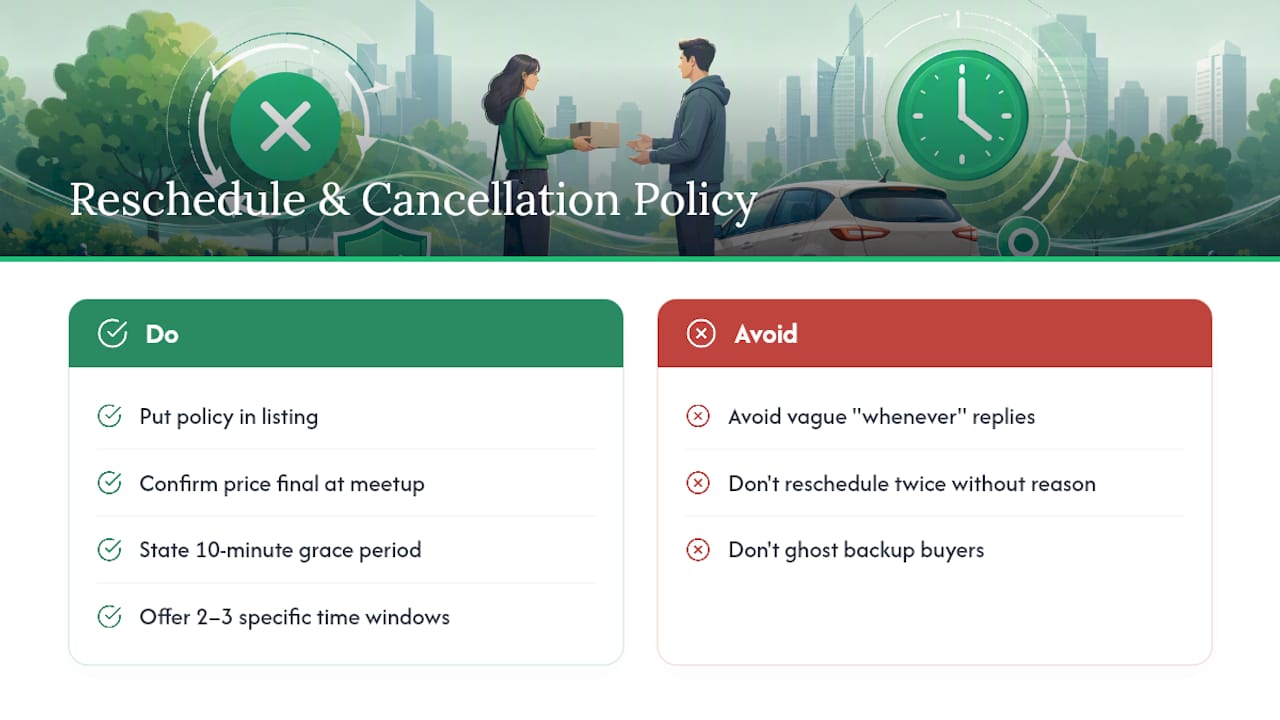
When a genuine reschedule request comes in, respond quickly and offer two or three specific alternative windows rather than an open-ended "whenever works." Vague flexibility invites more vagueness back. If someone reschedules twice without a real reason, that's usually your answer: move on to the next interested buyer rather than holding your evening open indefinitely.
For sellers juggling a hot listing, decide in advance how you'll handle competing interest. If two buyers want the same item, tell the second one honestly that you're finalizing with someone else first, and give them a real timeframe for when you'll know. That kind of clarity, even when it's not the answer they wanted, tends to keep your ratings solid and your inbox less chaotic. Silence or ghosting a backup buyer is what actually damages your reputation over time.
How to Set Clear Expectations Before You Ever Meet
Most meetup friction traces back to something that was never actually agreed on. The item's condition, the final price, who's bringing what, and exactly where you're standing all need to be nailed down in the chat before anyone drives anywhere.
State the price as final in your first confirmation message once a buyer commits, not as an opening bid you're still willing to negotiate down. If you're open to a small amount of flexibility, say so directly rather than letting a buyer assume there's room and show up ready to argue. The same goes for item condition: if there's a scratch, a missing accessory, or a repair history, mention it in writing before the meetup, not as a surprise the buyer discovers on-site.
Confirm who's actually showing up. If a buyer says a friend is coming along, or a seller mentions their partner will be dropping off the item instead, say so ahead of time so nobody's caught off guard by an unexpected extra person at the handoff. That single detail, mentioned casually in advance, avoids one of the more common red flags people report after the fact.
Time matters just as much as price. A confirmed window like "between 4:00 and 4:15 PM" does more work than "this afternoon sometime," because it gives both people a shared standard for what counts as on time versus a no-show. Restate the agreed details once, in your own words, right before you leave. If something doesn't match what the other person says back, you've caught the mismatch before it becomes an awkward standoff in a parking lot.
Managing Multiple Meetups Without Losing Track
Selling several items in the same week means juggling different buyers, times, and locations, and that's exactly when details start slipping. A missed confirmation or a double-booked time slot creates the kind of chaos that turns a good week of selling into a headache.
Block out meetup windows the same way you'd block calendar time for anything else, with a buffer of at least 15 to 20 minutes between each one. Traffic, a slow buyer, or an item that needs more explaining than expected will eat into that buffer fast, and stacking meetups back to back with zero cushion is how you end up rushing someone or showing up late to the next one.
If you're clearing out a large batch of items, event sellers often build a simple checklist ahead of time covering what's coming, what's already sold, and what still needs packaging, which keeps a full day of trades from turning into guesswork. A prep checklist built for event sellers offers a useful model for organizing multiple items even outside a formal event setting.
For group meetups, where several buyers want to see the same item or you're coordinating a bulk pickup, pick one meetup spot for the whole group rather than running separate trips across town. Stagger arrival times by 10 to 15 minutes so you're not managing multiple strangers in the same five minutes, and keep every conversation in its own separate chat thread so details don't get crossed between buyers.
A Quick Note From the Marketplaceapp Editorial Team
Safety habits that survive are the ones you don't have to think about twice. Save the checklist, reuse the confirmation template, and let MarketplaceAnywhere's chat and location tools handle the rest.
— Marketplace
List Faster and Meet Safer With MarketplaceAnywhere
MarketplaceAnywhere is built around the exact workflow this guide walks through, so you're not stitching together chat apps, cash apps, and guesswork to close a local deal. In-app chat keeps your negotiation history in one place, verified ratings give you a real signal before you agree to meet anyone, and location-based search surfaces nearby safe exchange zones without you hunting for them separately.
Secure payment options mean you're not stuck deciding between risky cash counts and unverifiable screenshots. Push notifications help remind both sides about their agreed arrival window. If you've got items sitting around that could use a buyer, list them on MarketplaceAnywhere and put this whole routine to work on your next trade.
Sources
- Dallas Oregon: Safe Exchange Zone guidance
- University of Michigan DPS: Safe exchange zone guidance
- MSI Safe Exchange Zone best practices (Mar 2023)
- Fairfax County Police Department News: Shop smart, meet safe tips (2026)